
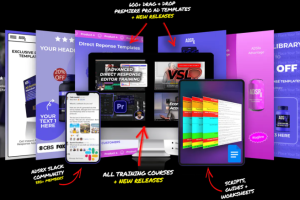

ADSRX – All Access Membership: Video Ad Templates, Creative Training & Direct Response Marketing
Good Editing Is Only Part of a Strong Video Advertisement
A video ad can have smooth transitions, attractive graphics, and impressive effects, yet still struggle to communicate why someone should care about the product.
That is because effective advertising involves more than editing. The message, opening hook, script, pacing, product demonstration, and call to action all influence how an advertisement communicates with its audience.
This is the area that ADSRX – All Access Membership aims to address.
ADSRX brings together video editing resources and direct-response advertising education in one membership. Instead of focusing exclusively on software tutorials, the program also explores the strategy behind video creative production.
Members can access a library of Premiere Pro templates, training courses, tutorials, community resources, and ongoing creative updates. The material is aimed at people who want to develop their editing abilities while gaining a better understanding of how video advertisements are planned and produced.
For someone working in ecommerce advertising, freelance video editing, agency creative production, or UGC content, this combination can be particularly relevant.
What Is ADSRX All Access Membership?
ADSRX is a training and creative-resource platform associated with direct-response video advertising. Its founder, Jon Reyes, presents the membership as a resource for editors, marketers, entrepreneurs, and creative teams who want to improve their approach to advertising production.
The official membership page describes several main components:
- A library of 600+ Premiere Pro templates and creative assets.
- Video editing tutorials and training resources.
- Advanced direct-response video editor training.
- Video sales letter advertising education.
- More than 25 hours of described training.
- A Slack community for members.
- Weekly live Q&A sessions.
- New template releases and updates.
- Custom template and training requests.
- Technical support.
The membership is designed to bring useful production resources and educational material together, helping members explore both the practical and strategic sides of creating video advertisements.
The exact number of assets and available training may change as the platform adds new material. Check the current membership page for the latest contents and subscription terms.
1. Explore a Large Collection of Premiere Pro Templates
One of the main attractions of ADSRX is its collection of ready-to-use Premiere Pro templates.
Starting an advertisement from an empty editing timeline can take considerable time, especially when producing multiple versions for different products, audiences, or campaigns.
Templates can provide a useful starting point by giving editors access to pre-designed visual elements that can be adapted to a specific project.
The official membership page describes more than 600 templates and assets, organized around different direct-response advertising categories.
The collection includes resources such as:
- Hooks and scroll stoppers.
- Call-to-action graphics.
- Headline and title elements.
- Branded visual elements.
- Product comparisons.
- Text overlays.
- Social media elements.
- Trust badges.
- Social proof graphics.
- Ad sequences.
- Grids and split-screen layouts.
- Sales and discount graphics.
- Scarcity and urgency elements.
- Emojis and visual accents.
- Sound effects.
These resources can help editors develop different visual approaches without designing every element from scratch.
For example, an ecommerce video ad might begin with a product demonstration, introduce a common customer problem, show a comparison, and finish with a clear offer. The editor can use different visual elements to make each section easier to follow.
Templates are starting points rather than finished advertising strategies. They still need to be customized to match the product, brand guidelines, campaign message, and intended audience.
2. Learn Premiere Pro Editing Techniques
Adobe Premiere Pro is widely used for video editing, but having access to the software does not automatically make the editing process efficient.
New users may struggle with timelines, transitions, text animations, graphic elements, and organizing projects. More experienced editors may know the software but want to improve the speed and structure of their advertising workflow.
ADSRX includes beginner-oriented Premiere Pro training as part of its wider resource library.
The official membership page describes a basic Premiere Pro training program with five modules and approximately 60 minutes of video instruction, alongside cheatsheets and guides.
This type of material may help learners become more familiar with the software and understand how to work with the available templates.
The wider template tutorial library also helps members explore how particular assets can be used and customized.
For someone who regularly creates social media advertisements, product videos, or promotional content, learning how to use editing resources efficiently can make the production process more organized.
3. Understand Advanced Direct-Response Video Editing
Knowing how to edit footage is different from understanding how to produce an advertisement with a clear marketing purpose.
An editor may be able to add captions, transitions, music, and animations but still need guidance on why a particular opening, sequence, or visual treatment makes sense for a campaign.
ADSRX includes an Advanced Direct Response Video Editor Training program.
The official membership page describes this training as having more than eight in-depth modules, over six hours of video instruction, live training recordings, cheatsheets, and guides.
The broader subject is direct-response creative production: creating advertisements with a specific message and an intended action.
Topics relevant to this approach include:
- Understanding the product and target customer.
- Researching advertising angles.
- Organizing the core message.
- Structuring video advertisements.
- Selecting appropriate visual elements.
- Presenting product benefits clearly.
- Using hooks to introduce an idea.
- Creating a logical progression between scenes.
- Making calls to action easy to understand.
For editors who want to move beyond purely technical execution, this strategic perspective is an important part of developing their skills.
4. Explore Video Sales Letter Advertising
A video sales letter, commonly called a VSL, is a video-based sales presentation designed to explain an offer and encourage a specific response.
Unlike a short promotional clip, a VSL may spend more time introducing a problem, explaining a proposed solution, addressing concerns, and presenting an offer.
ADSRX includes a training program called Master VSL Video Sales Letter Ads.
The official membership page describes five or more training modules, over two hours of video instruction, more than 20 VSL examples, scripts, and worksheets.
This section may be relevant to editors and marketers who want to understand how longer-form video advertisements are structured.
A VSL project can involve several creative decisions:
Opening: Introduce the central problem or idea in a way that makes sense for the intended audience.
Problem explanation: Help viewers understand the issue the product or service is designed to address.
Solution presentation: Explain how the offer works and what it actually includes.
Supporting material: Use demonstrations, relevant examples, and substantiated claims to make the message clearer.
Offer presentation: Explain the product, relevant terms, and the next step.
Call to action: Give viewers a straightforward way to respond.
The purpose of learning VSL production is not simply to make longer videos. It is to understand how visual presentation and messaging work together throughout a sales-focused video.
5. Develop a Better Understanding of Creative Strategy
One of the more interesting aspects of ADSRX is its emphasis on helping editors understand the strategy behind creative production.
In a traditional editing workflow, the editor may receive a script and raw footage, then focus on turning those materials into a finished video.
A creative strategist or direct-response producer may become involved much earlier, helping determine the advertising angle, research direction, messaging, and structure.
This broader perspective can make an editor more valuable to a creative team because they can contribute to the thinking behind the advertisement as well as its execution.
For example, consider an ecommerce brand selling a skincare product.
A campaign could explore different creative directions:
- A product demonstration showing how it is used.
- A customer-problem-focused concept.
- A comparison explaining product differences.
- An educational video addressing common questions.
- A founder-led explanation of the product.
- A UGC-style presentation.
Each concept communicates the product differently. The best direction depends on the audience, the product’s real features, and the campaign objective.
ADSRX’s direct-response training is intended to help learners think about these creative decisions rather than concentrating only on editing effects.
6. Explore Ecommerce Video Ad Production
Ecommerce brands regularly need video content for product promotion, social media advertising, product launches, and campaign testing.
The challenge is producing enough creative variations while maintaining a consistent message and brand presentation.
ADSRX includes a training program focused on ecommerce video ad production.
The official page describes this training as having ten modules, more than ten hours of video instruction, worksheets, and templates.
This topic may be especially useful to people who work with direct-to-consumer brands or want to build their knowledge of ecommerce advertising production.
An ecommerce video advertisement might include:
- A clear product introduction.
- A demonstration of how the product is used.
- An explanation of its relevant features.
- Visual examples of the product in context.
- Customer feedback where permission and authenticity are established.
- A relevant offer or next step.
Good creative production requires more than making a product look attractive. The advertisement should accurately communicate what the product does and why it may be relevant to the customer.
The training can provide a starting point for understanding how creative structure and production decisions fit into ecommerce advertising.
7. Learn From a Five-Day Direct-Response Editor Challenge
The ADSRX membership page also describes a five-day challenge called Become a Deadly Direct Response Video Editor.
The challenge is designed around developing a stronger understanding of the skills involved in producing direct-response video ads.
The official membership information describes five days of live training and more than six hours of video instruction, along with video ad scripts.
A challenge-based learning format can be useful for people who prefer working through a defined sequence rather than browsing unrelated tutorials.
For an editor, this can create an opportunity to think about the complete production process:
- Understand the purpose of the advertisement.
- Research the product and intended audience.
- Identify a suitable creative angle.
- Develop the script or visual sequence.
- Assemble the video.
- Review the message and presentation.
- Prepare the finished creative for its intended platform.
The exact challenge availability and delivery format should be checked before purchase, as live sessions and recorded resources may change.
8. Work With UGC and Social Advertising Formats
User-generated content, commonly known as UGC, has become an important format in digital advertising.
UGC-style videos often use a conversational presentation, product demonstrations, personal experiences, or creator-led explanations.
For editors, these videos can require a different approach from highly polished brand commercials.
The footage may include direct-to-camera speaking, product shots, subtitles, screen recordings, demonstrations, and supporting visuals.
A useful edit should preserve the natural tone of the content while making the message easier to follow.
ADSRX identifies UGC creators among the audiences its membership serves. Its wider collection of creative assets and direct-response training may be relevant to people working with this type of advertising.
The most important consideration is authenticity. Customer experiences and testimonials should never be fabricated, and advertising claims should accurately reflect the product.
9. Join the ADSRX Creative Community
Learning video advertising does not always need to be a solo activity.
Editors and marketers often benefit from seeing how other people approach creative projects, discussing production challenges, and learning from different experiences.
The official ADSRX membership includes access to a Slack community.
The platform describes this community as a place where entrepreneurs and creatives can collaborate, receive updates, access ongoing training, and participate in weekly live calls.
Community participation may be particularly useful for freelancers and independent editors who do not have a large internal creative team.
For example, a member might want feedback on a template, ask a technical question, or discuss how a particular video format could be adapted to a campaign.
The community also provides a setting for members to exchange ideas and stay informed about new resources.
Actual community activity and live-session schedules can change, so check the current membership terms for details.
10. Access Ongoing Template Releases and Updates
Creative tools become more useful when they can support different projects over time.
A template library is most valuable when its resources are organized, practical, and adaptable to different advertising requirements.
ADSRX describes monthly template releases and ongoing updates as part of its All Access offering.
This gives members a reason to revisit the resource library as new assets and training materials become available.
The platform also describes custom template and training requests. Members can suggest particular resources they would like to see considered for future development.
These requests are subject to the provider’s process and should not be treated as guaranteed custom production work.
11. Get Help With Templates and Technical Questions
Working with creative assets can sometimes involve technical issues.
An editor may need help understanding how a template works, customizing an element, or resolving a problem with a particular resource.
ADSRX describes tutorials, technical support, and template troubleshooting as part of the membership experience.
The official website also describes dedicated support and response targets.
For a person who regularly works with video templates, having access to documentation and assistance can be helpful when something does not work as expected.
Support response times and service arrangements should always be checked against the current membership terms.
Who Is ADSRX All Access Membership For?
The membership may be useful for several types of professionals.
Video Editors
Editors who already understand basic video editing but want to explore direct-response creative techniques, advertising structures, and reusable Premiere Pro resources.
Creative Strategists
People who want to develop their understanding of research, creative angles, messaging, and the planning behind advertising campaigns.
Ecommerce Brand Owners
Business owners who want to understand how video ads are produced and how different creative formats can support their product marketing.
Agency Owners
Agencies producing video advertisements for clients may find the template library and training relevant to their production workflow.
UGC Creators
Creators who produce product demonstrations, promotional videos, and brand content may benefit from learning more about advertising structure and presentation.
Freelancers
Independent editors can explore the resources as part of their professional development and expand their understanding of the creative work involved in video advertising.
Beginners
The basic Premiere Pro lessons may offer a starting point for beginners. However, people who are completely new to video production should be prepared to practice the software and develop their skills beyond watching tutorials.
What Software Do You Need?
The official membership describes its template collection as designed for Adobe Premiere Pro.
That means Premiere Pro is required to use the Premiere Pro templates as intended.
The training also covers broader advertising principles and creative strategy that may be relevant across different editing applications.
However, do not assume the downloadable templates are compatible with CapCut, Final Cut Pro, or DaVinci Resolve. Confirm software compatibility before purchasing.
Final Thoughts: Is ADSRX Worth Exploring?
ADSRX All Access Membership brings together several resources that are relevant to the modern video advertising workflow.
Its combination of Premiere Pro templates, direct-response editing education, VSL training, ecommerce video production lessons, community access, and ongoing releases makes it more than a basic editing tutorial library.
The most interesting part is the connection between creative execution and marketing strategy. Editors can explore not only how to assemble an advertisement but also how research, scripts, hooks, messaging, and visual structure influence the finished creative.
For people working in ecommerce, agencies, freelance editing, and UGC production, these subjects may be worth exploring.
The membership is best evaluated against your actual needs. Someone looking only for advanced cinematic filmmaking instruction may prefer a different type of course, while someone interested in direct-response video advertising may find the training and asset library more relevant.
ADSRX is a resource for developing video advertising skills and workflows—not a guarantee of profitable campaigns, client acquisition, or advertising results. The value depends on how well the material fits your work and how consistently you apply what you learn.
Frequently Asked Questions
1. What is ADSRX All Access Membership?
ADSRX All Access Membership is a video advertising training and resource membership that combines Premiere Pro templates, editing tutorials, direct-response marketing education, community access, and ongoing creative resources.
2. Who created ADSRX?
ADSRX is associated with Jon Reyes, a direct-response video production and creative advertising entrepreneur. The official website presents him as the founder and CEO.
3. What is included in ADSRX All Access?
The official membership page describes access to 600+ Premiere Pro templates, courses and tutorials, more than 25 hours of training, a Slack community, weekly live Q&A sessions, template updates, and support.
4. Does ADSRX include Premiere Pro templates?
Yes. The All Access Membership is described as including a library of more than 600 Premiere Pro templates and creative assets, with new releases and updates.
5. Do I need Adobe Premiere Pro?
You need Adobe Premiere Pro to use the Premiere Pro templates as intended. The broader training also covers strategy and techniques that can be useful beyond a particular editing application.



Reviews
There are no reviews yet.