
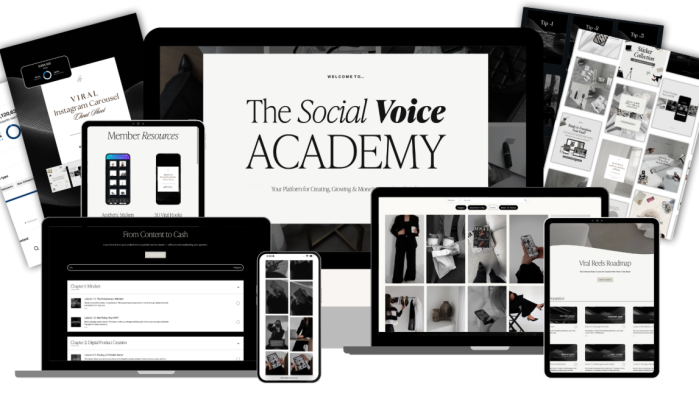

Caitlin Armstrong – The Social Voice Academy
A Better Content Routine Starts Before You Press Record
There is a particular kind of frustration that comes with trying to grow on social media. You know you should be posting regularly, but every new post seems to require a fresh round of decisions. What should the topic be? Does the design match your brand? Is the video interesting enough to hold attention? Should you use a trend, share a personal story, teach something, or promote an offer?
Then comes the editing, captions, scheduling, and the question of whether any of that content is actually helping your business.
The Social Voice Academy, created by Caitlin Armstrong, approaches this challenge from a broader perspective. Rather than treating social media as a never-ending collection of individual posts, the academy brings together several parts of the creator process: planning, design, video editing, brand development, platform strategy, and monetization.
The idea is to give creators a more organized way to work. Instead of starting from an empty screen every time they need to publish something, they can develop a repeatable process and use resources that make content production more manageable.
For anyone building a personal brand, growing a small business account, or developing an audience around digital products, that combination is worth exploring.
The Academy at a Glance
The Social Voice Academy is presented as a content and education ecosystem. Its official website highlights several connected areas:
- Social media content creation and planning
- Personal branding and consistent visual identity
- Reels editing using CapCut and Edits
- Canva design and editable templates
- Content strategy and platform awareness
- Digital product and affiliate monetization
- Stock video, image, and resource libraries
The exact files, lessons, and access rights can vary by package. Buyers should check the contents of the specific edition being offered rather than assume every advertised membership feature is included.
1. Build a Content Style People Can Recognize
A recognizable online presence is not created by choosing a nice font and using the same colors on every graphic. It comes from the overall impression a brand leaves behind: the subjects it talks about, the way it communicates, the visuals it uses, and the expectations people develop when they see another post.
The academy places personal branding alongside content strategy and production. That matters because creators can spend a great deal of time making attractive content without developing a consistent identity behind it.
A more deliberate approach begins with a few practical questions:
- Who are you trying to reach?
- What subjects should people associate with your account?
- What tone feels natural for your brand?
- Which visual elements should remain consistent?
- What do you want someone to understand or do after seeing your content?
These decisions give content a direction. They can also make it easier to decide which ideas belong on the account and which ones are distractions.
For a new creator, this can help establish a foundation. For an existing business, it can provide a reason to review a feed that has become visually inconsistent or difficult to understand.
2. Make Reels Without Turning Editing Into a Full-Time Job
Short-form video is an important part of modern social media, but the editing process can become a bottleneck. A creator may have plenty of ideas and footage yet struggle to turn them into finished videos consistently.
The Social Voice Academy advertises Reels editing education covering tools such as CapCut and Edits. Its official materials describe an emphasis on clean visuals, pacing, transitions, captions, and a more polished presentation.
This is useful territory for creators who want to improve their editing without immediately moving into complicated professional software.
A practical Reels workflow can involve:
- Choosing a topic that fits the account’s content direction.
- Deciding on the opening hook or visual.
- Preparing footage or selecting suitable supporting clips.
- Arranging the clips into a clear sequence.
- Adding text, captions, and transitions where they serve the message.
- Reviewing the finished video before publishing.
The point is not to add effects to every second of a video. Good editing should make the message easier to follow. A clear opening, sensible pacing, readable captions, and a relevant visual can often do more than a collection of unnecessary transitions.
The academy’s editing component is intended to help creators develop that production skill and make short-form content a more repeatable part of their routine.
3. Use Canva to Keep Your Visuals Consistent
A social media brand needs more than video. Carousels, stories, promotional graphics, educational posts, and simple announcements all contribute to the way an account looks and communicates.
The academy advertises a dedicated Canva course and an editable template library. These resources are designed to help users create and customize visual content without having to design every asset from the beginning.
For someone who is new to Canva, a structured introduction can make the platform less intimidating. For someone who already uses it, templates can provide a starting point for producing content more efficiently.
The important part is learning to customize rather than simply copying a design. A template should support your message, not replace your brand identity. Adjusting the colors, typography, images, spacing, and wording helps make the finished graphic feel more connected to the business using it.
Possible applications include:
- Instagram carousel posts
- Story graphics and announcements
- Educational content
- Product and service promotions
- Lead-generation posts
- Brand-consistent social media designs
The official academy page advertises a library of more than 800 editable Canva templates. Check the specific package being offered to confirm whether that library is included.
4. Move From Random Posting to Intentional Content
Posting frequently is not the same as having a content strategy.
A useful content plan gives each post a reason to exist. One post might introduce a problem your audience experiences. Another might explain a process, answer a common question, share a useful perspective, or introduce an offer.
The Social Voice Academy promotes content planning and platform strategy as part of its wider system. Its official description discusses content pillars, algorithm awareness, and creating posts with a clearer purpose.
This can help creators move away from the daily question of “What should I post?” and toward a more organized calendar.
For example, a service provider might build a weekly content routine around:
- Helpful advice that demonstrates expertise
- Behind-the-scenes posts that make the business more relatable
- Educational Reels that introduce useful ideas
- Customer questions and common objections
- Posts that explain the service or invite enquiries
The exact mix will depend on the audience and business. There is no universal posting formula that guarantees reach or sales. The value of a strategy is that it gives the creator a framework to test, review, and improve over time.
5. Understand the Business Side of Content
An audience can be valuable, but attention alone does not automatically create a business. Creators need to understand what they offer, who benefits from it, and how their content connects with a relevant product or service.
The academy’s Content to Cash training is advertised around monetization, including digital products, services, and affiliate opportunities.
That makes the program relevant to people who are interested in more than growing their follower count. A creator might use educational posts to introduce a problem, share practical information that builds trust, and then direct interested viewers toward a suitable offer.
Digital products are one possible route. Depending on the creator’s knowledge and audience, these could include templates, guides, workbooks, or other downloadable resources. Affiliate marketing is another option, where a creator recommends a relevant product and may receive a commission when a qualifying purchase is made.
Neither approach is automatic. An offer still needs to be useful, properly presented, and relevant to the people seeing it. Content can help communicate value, but it cannot guarantee conversions or income.
The academy’s monetization component is intended to connect content activity with a more deliberate business model.
6. Make Use of Ready-Made Resources
One of the practical attractions of a resource-based creator platform is the ability to start with existing assets.
The official Social Voice website advertises stock videos and images, edited Reels, Canva templates, and a growing resource library. It describes these materials as tools for creating and repurposing content across social platforms and other marketing uses.
A resource library can be particularly helpful when time is limited. A small business owner may not have the budget to produce original photography every week. A beginner may not yet have a large collection of footage. Templates and stock assets can help fill some of those gaps.
However, ready-made content should still be selected carefully. Not every stock clip fits every brand, and a template does not automatically make a message persuasive. The strongest results come from adapting resources to the audience, offer, and voice of the business.
Before publishing or reselling any supplied asset, users should also review its license and permitted usage. Access to a file does not necessarily mean unrestricted rights to redistribute it.
Frequently Asked Questions
1. What is Caitlin Armstrong – The Social Voice Academy?
The Social Voice Academy is a content education and resource platform focused on social media creation, branding, editing, content strategy, and monetization. It is designed for creators and business owners who want a more organized approach to building an online presence.
2. What topics are covered in the academy?
The official website advertises training in Reels editing, Canva, content strategy, personal branding, and content monetization. It also promotes stock content, editable templates, and additional creator resources.
3. Does the academy teach video editing?
Yes. The official academy page advertises Reels editing training using tools such as CapCut and Edits, with topics including visual presentation, pacing, transitions, and captions.
4. Is Canva included?
The official education package advertises a Canva course and access to a template library. Confirm that these are included in the particular version or package being purchased.
5. Can beginners use The Social Voice Academy?
The official website describes the academy as suitable for creators at different stages, including beginners. Familiarity with social media tools can still make it easier to put the lessons into practice.
6. Does the academy cover monetization?
Yes. Its Content to Cash training is advertised around monetization approaches such as digital products, services, and affiliate marketing. Actual income depends on the offer, audience, execution, and other business factors.
7. Which social media platform does it focus on?
The official FAQ identifies Instagram as its primary focus, while noting that some principles can also be applied to platforms such as Threads and Pinterest.
8. Do I need Canva or CapCut?
The official website recommends tools such as Canva, CapCut, and Edits to follow the relevant training. Check the current software requirements before purchasing.
Who May Find the Academy Useful?
The Social Voice Academy may be worth considering for:
New content creators: People who want a more structured starting point for branding, Canva, and short-form video.
Personal-brand builders: Coaches, consultants, educators, and freelancers who need a recognizable online identity.
Small business owners: Businesses that want to produce more of their own social media content instead of outsourcing every design or video.
Digital product sellers: Creators who want to connect content planning with the promotion of downloadable products and other offers.
Affiliate marketers: People who want to understand how content can support product recommendations and affiliate promotions.
Existing creators: Users who already post regularly but want to improve their editing process, visual consistency, or content planning.
It is not a shortcut around understanding an audience. The resources and training still need to be applied, tested, and adapted to the individual business.
What to Consider Before Joining
A few practical details deserve attention before purchasing.
First, distinguish the academy’s official education package from its separate content-library subscriptions. The official website lists different access options, and not every plan includes the same training.
Second, check the tools required. The advertised learning areas reference Canva, CapCut, and Edits. Some features or workflows may depend on the software version or subscription plan you use.
Third, review the actual package contents. Stock assets, templates, future updates, community access, and affiliate benefits should only be expected when they are expressly included in the offer being purchased.
Finally, remember that social media platforms change. A lesson about a particular feature or trend may need to be adapted as Instagram and other platforms evolve.
Final Thoughts: Build a Process, Not Just a Posting Habit
The Social Voice Academy brings together several skills that creators often learn separately: visual design, Reels editing, content planning, personal branding, and monetization.
That combination is its central appeal. Instead of focusing on one narrow social media tactic, it presents a broader way to approach the work behind a creator-led brand.
For beginners, the value may be having a more organized place to learn and access useful resources. For experienced creators, it may be the opportunity to refine their production workflow and connect content more closely with business goals.
The best way to approach the academy is as a working toolkit. Choose a content direction, practice the editing and design skills, create a publishing routine, and evaluate how your audience responds. Then adjust the process based on what you learn.
A stronger social presence is built through clear communication and consistent execution—not by templates or tools alone.
Course: Caitlin Armstrong – The Social Voice Academy
Main focus: Social media content creation, Reels editing, Canva, branding, strategy, and monetization
Suggested audience: Creators, personal brands, freelancers, and small business owners




Reviews
There are no reviews yet.